软件工程实践二:Spring Boot 知识回顾

IsayIsee Lv3

文章来源说明:

  • 作者: [xuan]
  • 发布平台: [Xuan’s blog]
  • 原链接: https://blog.ybyq.wang/archives/1099.html
  • 发布时间: [2025-09-10]
  • 转载用途: 仅供学习和技术交流

    版权归原作者所有,本文仅做整理和分享之用。

软件工程实践二:Spring Boot 知识回顾

使用 IntelliJ IDEA 创建 Spring Boot Web 项目(仅 Web 依赖)

目标:用 IntelliJ IDEA 快速创建只包含 Spring Web 的最小可运行项目,启动后通过浏览器访问 http://localhost:8080/api/hello 返回 JSON。

一、创建项目(Spring Boot 向导)

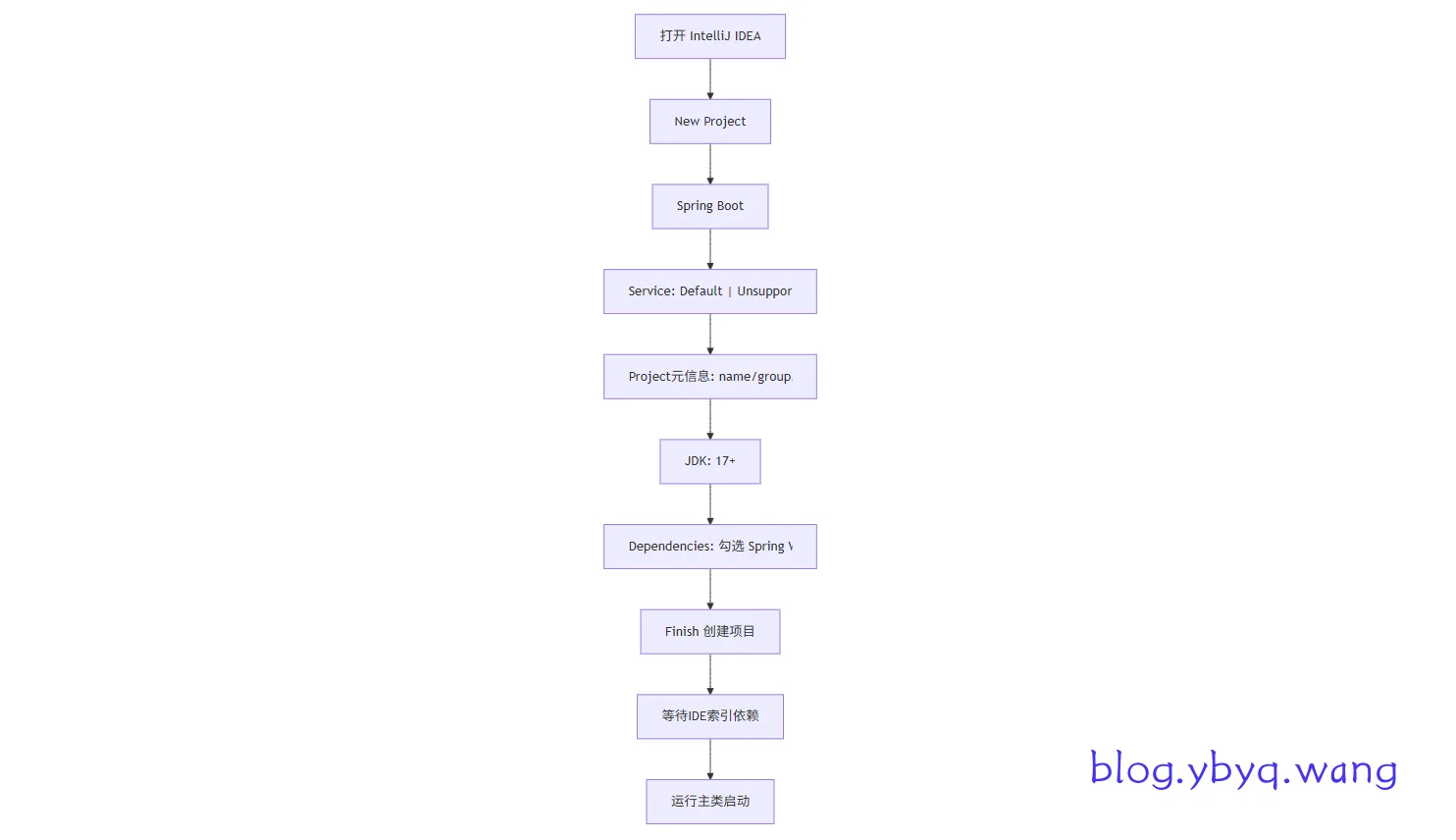
创建项目

步骤说明:

  • 打开 IDEA → New Project → 选择 Spring Boot;服务地址保持默认。
  • Project Metadata:
    • Group:如 com.example
    • Artifact/Name:如 demo
    • Packaging:jar(默认)
    • Java:17(或本机已安装的 LTS 版本)
  • Build system:Maven(不要选 Gradle)
  • Dependencies:搜索并仅勾选 Spring Web
  • Finish → 等待 Maven 下载依赖与索引完成。

提示:若看不到 Spring Boot(Initializr),确保安装了 IntelliJ 的 Spring 插件,或使用 File > New > Project... 再选择。

二、项目最小代码示例

1) 主启动类(IDE 已生成,检查包名与类名)

1
2
3
4
5
6
7
8
9
10
11
package com.example.demo;

import org.springframework.boot.SpringApplication;
import org.springframework.boot.autoconfigure.SpringBootApplication;

@SpringBootApplication
public class DemoApplication {
public static void main(String[] args) {
SpringApplication.run(DemoApplication.class, args);
}
}

2) Hello 控制器(新增)

1
2
3
4
5
6
7
8
9
10
11
12
13
14
15
16
17
18
19
20
package com.example.demo.controller;

import org.springframework.web.bind.annotation.GetMapping;
import org.springframework.web.bind.annotation.RequestMapping;
import org.springframework.web.bind.annotation.RestController;

import java.util.Date;
import java.util.Map;

@RestController
@RequestMapping("/api")
public class HelloController {
@GetMapping("/hello")
public Map<String, Object> hello() {
return Map.of(
"msg", "hello",
"time", new Date()
);
}
}

3) 应用配置(可选)

1
2
3
4
# src/main/resources/application.yml
server:
# 如需修改端口,取消注释并调整值
# port: 8080

三、运行与验证

  • DemoApplication 类左侧点击绿色运行箭头,或使用菜单 Run
  • 控制台看到 Started DemoApplication ... 表示启动成功。
  • 浏览器/工具访问:http://localhost:8080/api/hello
    • 期望响应示例:
      1
      {"msg":"hello","time":"2025-01-01T00:00:00Z"}

常见问题:

  • 端口占用:在 application.yml 配置 server.port: 8081
  • 依赖未下载:检查网络代理或尝试 Reload All Maven Projects
  • JDK 不匹配:Project Structure > Project/Modules 指定与向导一致的 Java 版本。

四、标准目录结构与说明

1
2
3
4
5
6
7
8
9
10
11
12
13
14
15
16
17
18
demo/                          ← 工程根目录
├─ pom.xml ← 构建脚本(Maven)
├─ src
│ ├─ main
│ │ ├─ java
│ │ │ └─ com
│ │ │ └─ example
│ │ │ └─ demo
│ │ │ ├─ DemoApplication.java ← 启动类
│ │ │ └─ controller
│ │ │ └─ HelloController.java ← Web 控制器
│ │ └─ resources
│ │ ├─ application.yml ← 应用配置
│ │ └─ static/ templates/ ← 静态资源/模板(可选)
│ └─ test
│ └─ java
│ └─ com.example.demo
│ └─ DemoApplicationTests.java ← 测试类
  • DemoApplication:应用入口,@SpringBootApplication 聚合配置并触发自动装配。
  • controller:放置 @RestController@Controller 等 Web 层类。
  • resources
    • application.yml|yaml:端口、数据源、日志级别等配置。
    • static/:静态文件(css/js/img)。
    • templates/:模板引擎(如 Thymeleaf)页面,需相应依赖时使用。
  • test:单元/集成测试。

五、Maven 依赖最小示例(仅供参考)

1
2
3
4
5
6
7
8
9
10
11
12
13
14
15
16
17
18
19
20
21
22
23
24
25
26
27
28
29
30
31
32
33
34
35
36
37
38
39
40
41
42
43
44
<?xml version="1.0" encoding="UTF-8"?>
<project xmlns="http://maven.apache.org/POM/4.0.0"
xmlns:xsi="http://www.w3.org/2001/XMLSchema-instance"
xsi:schemaLocation="http://maven.apache.org/POM/4.0.0 https://maven.apache.org/xsd/maven-4.0.0.xsd">
<modelVersion>4.0.0</modelVersion>

<parent>
<groupId>org.springframework.boot</groupId>
<artifactId>spring-boot-starter-parent</artifactId>
<version>3.5.4</version>
<relativePath/>
</parent>

<groupId>com.example</groupId>
<artifactId>demo</artifactId>
<version>0.0.1-SNAPSHOT</version>
<name>demo</name>
<description>Demo project for Spring Boot</description>

<properties>
<java.version>17</java.version>
</properties>

<dependencies>
<dependency>
<groupId>org.springframework.boot</groupId>
<artifactId>spring-boot-starter-web</artifactId>
</dependency>
<dependency>
<groupId>org.springframework.boot</groupId>
<artifactId>spring-boot-starter-test</artifactId>
<scope>test</scope>
</dependency>
</dependencies>

<build>
<plugins>
<plugin>
<groupId>org.springframework.boot</groupId>
<artifactId>spring-boot-maven-plugin</artifactId>
</plugin>
</plugins>
</build>
</project>

六、常用配置(application.yml 示例)

1
2
3
4
5
6
7
8
9
10
11
12
13
14
15
16
spring:
application:
name: demo
jackson:
time-zone: Asia/Shanghai
date-format: yyyy-MM-dd HH:mm:ss

server:
port: 8080
# servlet:
# context-path: /api

logging:
level:
root: INFO
com.example.demo: DEBUG

多环境配置(Profiles)示例:

1
2
3
4
# application-dev.yml(开发环境)
logging:
level:
com.example.demo: DEBUG
1
2
3
4
# application-prod.yml(生产环境)
logging:
level:
root: INFO

运行时指定环境:

1
2
3
spring:
profiles:
active: dev

或启动参数:--spring.profiles.active=prod

全局 CORS(跨域)配置:

1
2
3
4
5
6
7
8
9
10
11
12
13
14
15
16
package com.example.demo.config;

import org.springframework.context.annotation.Configuration;
import org.springframework.web.servlet.config.annotation.CorsRegistry;
import org.springframework.web.servlet.config.annotation.WebMvcConfigurer;

@Configuration
public class WebCorsConfig implements WebMvcConfigurer {
@Override
public void addCorsMappings(CorsRegistry registry) {
registry.addMapping("/**")
.allowedOrigins("http://localhost:3000")
.allowedMethods("GET", "POST", "PUT", "DELETE", "OPTIONS")
.allowCredentials(true);
}
}

全局异常处理:

1
2
3
4
5
6
7
8
9
10
11
12
13
14
15
16
17
18
package com.example.demo.common;

import org.springframework.web.bind.annotation.ExceptionHandler;
import org.springframework.web.bind.annotation.RestControllerAdvice;

import java.util.Map;

@RestControllerAdvice
public class GlobalExceptionHandler {
@ExceptionHandler(Exception.class)
public Map<String, Object> handle(Exception ex) {
return Map.of(
"success", false,
"error", ex.getClass().getSimpleName(),
"message", ex.getMessage()
);
}
}

七、返回 JSON 与统一异常

案例 1:路径参数 + 查询参数 + JSON 返回

1
2
3
4
5
6
7
8
9
10
11
12
13
14
15
16
17
18
19
20
21
22
23
24
package com.example.demo.controller;

import org.springframework.web.bind.annotation.*;

import java.util.Map;

@RestController
@RequestMapping("/api/users")
public class UserController {

@GetMapping("/{id}")
public Map<String, Object> getUser(@PathVariable Long id,
@RequestParam(defaultValue = "false") boolean detail) {
return Map.of("id", id, "name", "Alice", "detail", detail);
}

public record CreateUserRequest(String name, Integer age) {}

@PostMapping
public Map<String, Object> create(@RequestBody CreateUserRequest req) {
long generatedId = System.currentTimeMillis();
return Map.of("id", generatedId, "name", req.name(), "age", req.age());
}
}

案例 2:触发异常并由全局异常处理返回统一结构

1
2
3
4
@GetMapping("/error")
public Map<String, Object> error() {
throw new IllegalStateException("示例异常");
}

测试命令示例:

1
2
3
4
5
6
7
8
9
10
# 获取用户(携带查询参数 detail)
curl "http://localhost:8080/api/users/1?detail=true"

# 创建用户(POST JSON)
curl -X POST "http://localhost:8080/api/users" \
-H "Content-Type: application/json" \
-d "{\"name\":\"Bob\",\"age\":20}"

# 触发错误,查看统一异常返回
curl "http://localhost:8080/api/users/error"

八、@Value 配置读取示例

application.yml 定义配置:

1
2
3
4
5
6
7
8
9
app:
name: demo-app
timeout: 5s
white-list:
- 127.0.0.1
- 10.0.0.1
db:
host: 127.0.0.1
port: 3306

使用 @Value 读取:

1
2
3
4
5
6
7
8
9
10
11
12
13
14
15
16
17
18
19
20
21
22
23
24
25
26
27
28
29
30
31
package com.example.demo.config;

import org.springframework.beans.factory.annotation.Value;
import org.springframework.stereotype.Component;

import java.time.Duration;

@Component
public class AppValueExample {

@Value("${app.name}")
private String appName;

@Value("${app.timeout:3s}")
private Duration timeout;

@Value("${app.white-list[0]:127.0.0.1}")
private String firstWhiteIp;

@Value("${app.db.host:localhost}")
private String dbHost;

@Value("${app.db.port:3306}")
private Integer dbPort;

public String getAppName() { return appName; }
public Duration getTimeout() { return timeout; }
public String getFirstWhiteIp() { return firstWhiteIp; }
public String getDbHost() { return dbHost; }
public Integer getDbPort() { return dbPort; }
}

说明:

  • 默认值语法:${key:defaultValue},当 key 不存在时使用 defaultValue
  • 类型转换:Duration/int/boolean 等常见类型由 Spring 自动转换(如 5s -> Duration.ofSeconds(5))。
  • 列表索引:${list[0]} 访问第一个元素。
  • 建议:若配置项较多/需要分组,优先使用 @ConfigurationProperties 进行批量绑定与校验。

九、日志引入与配置(SLF4J + Logback)

  • 默认:spring-boot-starter-logging 已内置,提供 SLF4J API + Logback 实现。
1
2
3
4
5
6
7
8
9
10
11
12
13
14
15
16
17
18
19
20
21
22
23
package com.example.demo.controller;

import org.slf4j.Logger;
import org.slf4j.LoggerFactory;
import org.springframework.web.bind.annotation.GetMapping;
import org.springframework.web.bind.annotation.RequestMapping;
import org.springframework.web.bind.annotation.RestController;

import java.util.Date;
import java.util.Map;

@RestController
@RequestMapping("/api")
public class HelloControllerWithLog {
private static final Logger log = LoggerFactory.getLogger(HelloControllerWithLog.class);

@GetMapping("/hello2")
public Map<String, Object> hello() {
log.info("hello endpoint called at {}", new Date());
log.debug("debug details...");
return Map.of("msg", "hello", "time", new Date());
}
}

最小 application.yml 配置:

1
2
3
4
5
6
7
8
9
10
11
logging:
level:
root: INFO
com.example.demo: DEBUG
file:
name: logs/app.log
logback:
rollingpolicy:
max-file-size: 10MB
max-history: 7
total-size-cap: 1GB

常用说明:

  • logging.level.<包名>:设置指定包日志级别。
  • logging.file.name:直接指定日志文件;或使用 logging.file.path 指定目录(文件名默认为 spring.log)。
  • logging.logback.rollingpolicy.*:文件按大小/历史保留自动滚动。
  • 自定义输出格式可用:logging.pattern.console / logging.pattern.file
  • 进阶:切换 Log4j2 需在 pom.xml 引入 spring-boot-starter-log4j2 并排除默认 logging 依赖。

十、@ConfigurationProperties 批量绑定与校验

配置(支持嵌套对象、列表、Map、时长等类型):

1
2
3
4
5
6
7
8
9
app:
name: demo-app
timeout: 5s
white-list:
- 127.0.0.1
- 10.0.0.1
db:
host: 127.0.0.1
port: 3306

属性类:

1
2
3
4
5
6
7
8
9
10
11
12
13
14
15
16
17
18
19
20
21
22
23
24
25
26
27
28
29
30
31
32
33
34
35
36
37
38
package com.example.demo.config;

import org.springframework.boot.context.properties.ConfigurationProperties;
import org.springframework.boot.convert.DurationUnit;

import java.time.Duration;
import java.time.temporal.ChronoUnit;
import java.util.List;

@ConfigurationProperties(prefix = "app")
public class AppProperties {
private String name;

@DurationUnit(ChronoUnit.SECONDS)
private Duration timeout = Duration.ofSeconds(3);

private List<String> whiteList;
private Database db = new Database();

public static class Database {
private String host;
private int port = 3306;

public String getHost() { return host; }
public void setHost(String host) { this.host = host; }
public int getPort() { return port; }
public void setPort(int port) { this.port = port; }
}

public String getName() { return name; }
public void setName(String name) { this.name = name; }
public Duration getTimeout() { return timeout; }
public void setTimeout(Duration timeout) { this.timeout = timeout; }
public List<String> getWhiteList() { return whiteList; }
public void setWhiteList(List<String> whiteList) { this.whiteList = whiteList; }
public Database getDb() { return db; }
public void setDb(Database db) { this.db = db; }
}

启用方式(三选一):

1
2
3
4
5
6
7
8
// 推荐:在启动类上开启扫描
@SpringBootApplication
@ConfigurationPropertiesScan
public class DemoApplication {
public static void main(String[] args) {
SpringApplication.run(DemoApplication.class, args);
}
}

校验依赖:

1
2
3
4
<dependency>
<groupId>org.springframework.boot</groupId>
<artifactId>spring-boot-starter-validation</artifactId>
</dependency>

十一、GET 参数处理与示例

GET 适用于通过查询参数与路径变量传递轻量数据;GET 不能上传文件(multipart/form-data)。

1
2
3
4
5
6
7
8
9
10
11
12
13
14
15
16
17
18
19
20
21
22
23
24
25
26
27
28
29
30
31
32
33
34
35
36
37
38
39
40
41
42
43
44
45
46
47
48
49
50
51
52
53
54
55
56
57
58
59
60
61
62
63
64
65
66
67
68
69
70
71
72
73
74
75
76
77
78
79
80
81
82
83
84
85
86
87
88
89
90
package com.example.demo.controller;

import org.slf4j.Logger;
import org.slf4j.LoggerFactory;
import org.springframework.format.annotation.DateTimeFormat;
import org.springframework.util.MultiValueMap;
import org.springframework.web.bind.annotation.*;

import java.time.Duration;
import java.time.LocalDate;
import java.time.LocalDateTime;
import java.util.List;
import java.util.Map;

@RestController
@RequestMapping("/api/get")
public class GetParamController {
private static final Logger log = LoggerFactory.getLogger(GetParamController.class);

// 1) 简单类型 + 默认值
@GetMapping("/simple")
public Map<String, Object> simple(
@RequestParam String name,
@RequestParam(defaultValue = "18") Integer age,
@RequestParam(defaultValue = "false") boolean active) {
log.info("GET simple: name={}, age={}, active={}", name, age, active);
return Map.of("name", name, "age", age, "active", active);
}

// 2) 列表参数(重复 key:?tags=a&tags=b)
@GetMapping("/list")
public Map<String, Object> list(@RequestParam(required = false) List<String> tags) {
return Map.of("tags", tags);
}

// 3) 所有查询参数(平铺)
@GetMapping("/all")
public Map<String, Object> all(@RequestParam Map<String, String> params) {
return Map.of("params", params);
}

// 4) 所有查询参数(允许一个 key 多个值)
@GetMapping("/all-multi")
public Map<String, Object> allMulti(@RequestParam MultiValueMap<String, String> params) {
return Map.of("params", params);
}

// 5) DTO 绑定
public static class QueryDto {
private String keyword;
private Integer page;
private Boolean highlight;

public String getKeyword() { return keyword; }
public void setKeyword(String keyword) { this.keyword = keyword; }
public Integer getPage() { return page; }
public void setPage(Integer page) { this.page = page; }
public Boolean getHighlight() { return highlight; }
public void setHighlight(Boolean highlight) { this.highlight = highlight; }
}

@GetMapping("/dto")
public Map<String, Object> dto(@ModelAttribute QueryDto q) {
return Map.of("q", Map.of(
"keyword", q.getKeyword(),
"page", q.getPage(),
"highlight", q.getHighlight()
));
}

// 6) 路径参数 + 查询参数
@GetMapping("/users/{id}")
public Map<String, Object> user(@PathVariable Long id,
@RequestParam(defaultValue = "false") boolean verbose) {
return Map.of("id", id, "verbose", verbose);
}

// 7) 日期/时间/Duration
@GetMapping("/time")
public Map<String, Object> time(
@RequestParam @DateTimeFormat(iso = DateTimeFormat.ISO.DATE) LocalDate day,
@RequestParam @DateTimeFormat(iso = DateTimeFormat.ISO.DATE_TIME) LocalDateTime at,
@RequestParam(required = false) Duration timeout) {
return Map.of(
"day", day,
"at", at,
"timeoutSeconds", timeout != null ? timeout.getSeconds() : null
);
}
}

提示:

  • GET 不支持文件上传;文件请使用 POST multipart/form-data
  • List<String> 通过重复 key 传递最稳妥(如 ?tags=a&tags=b)。
  • Duration 在查询参数中推荐使用 ISO-8601 表达(如 PT30SPT5M)。

十二、POST 参数上传与示例

常见 POST 载荷类型:application/jsonapplication/x-www-form-urlencodedmultipart/form-datatext/plainapplication/octet-stream

1
2
3
4
5
6
7
8
9
10
11
12
13
14
15
16
17
18
19
20
21
22
23
24
25
26
27
28
29
30
31
32
33
34
35
36
37
38
39
40
41
42
43
44
45
46
47
48
49
50
51
52
53
54
55
56
57
58
59
60
61
62
63
64
65
66
67
68
69
70
71
72
73
74
75
76
77
78
79
80
81
82
83
84
85
86
87
88
89
90
91
92
package com.example.demo.controller;

import org.slf4j.Logger;
import org.slf4j.LoggerFactory;
import org.springframework.web.bind.annotation.*;
import org.springframework.web.multipart.MultipartFile;

import java.io.IOException;
import java.util.List;
import java.util.Map;

@RestController
@RequestMapping("/api/post")
public class PostParamController {
private static final Logger log = LoggerFactory.getLogger(PostParamController.class);

public static class CreateUserRequest {
private String name;
private Integer age;
private List<String> tags;

public String getName() { return name; }
public void setName(String name) { this.name = name; }
public Integer getAge() { return age; }
public void setAge(Integer age) { this.age = age; }
public List<String> getTags() { return tags; }
public void setTags(List<String> tags) { this.tags = tags; }
}

// 1) application/json
@PostMapping(value = "/json", consumes = "application/json")
public Map<String, Object> json(@RequestBody CreateUserRequest req) {
return Map.of("ok", true, "data", Map.of(
"name", req.getName(), "age", req.getAge(), "tags", req.getTags()
));
}

// 2) application/x-www-form-urlencoded
@PostMapping(value = "/form", consumes = "application/x-www-form-urlencoded")
public Map<String, Object> form(@RequestParam String name,
@RequestParam Integer age,
@RequestParam(required = false) List<String> tags) {
return Map.of("name", name, "age", age, "tags", tags);
}

// 3) multipart/form-data:单文件
@PostMapping(value = "/file", consumes = "multipart/form-data")
public Map<String, Object> uploadFile(@RequestParam("file") MultipartFile file,
@RequestParam(required = false) String desc) throws IOException {
return Map.of("filename", file.getOriginalFilename(), "size", file.getSize(), "desc", desc);
}

// 4) multipart/form-data:多文件
@PostMapping(value = "/files", consumes = "multipart/form-data")
public Map<String, Object> uploadFiles(@RequestParam("files") List<MultipartFile> files) {
var names = files.stream().map(MultipartFile::getOriginalFilename).toList();
var sizes = files.stream().map(MultipartFile::getSize).toList();
return Map.of("count", files.size(), "names", names, "sizes", sizes);
}

// 5) multipart/form-data:混合 JSON + 文件
public static class Meta {
private String title;
private Integer count;

public String getTitle() { return title; }
public void setTitle(String title) { this.title = title; }
public Integer getCount() { return count; }
public void setCount(Integer count) { this.count = count; }
}

@PostMapping(value = "/mixed", consumes = "multipart/form-data")
public Map<String, Object> mixed(@RequestPart("meta") Meta meta,
@RequestPart("file") MultipartFile file) {
return Map.of(
"meta", Map.of("title", meta.getTitle(), "count", meta.getCount()),
"file", Map.of("name", file.getOriginalFilename(), "size", file.getSize())
);
}

// 6) text/plain
@PostMapping(value = "/text", consumes = "text/plain")
public Map<String, Object> text(@RequestBody String body) {
return Map.of("length", body != null ? body.length() : 0, "body", body);
}

// 7) application/octet-stream
@PostMapping(value = "/binary", consumes = "application/octet-stream")
public Map<String, Object> binary(@RequestBody byte[] data) {
return Map.of("size", data != null ? data.length : 0);
}
}

示例请求(curl):

1
2
3
4
5
6
7
8
9
10
11
12
13
14
15
16
17
18
19
20
21
22
23
24
25
26
27
28
29
30
31
# 1) JSON
curl -X POST "http://localhost:8080/api/post/json" \
-H "Content-Type: application/json" \
-d '{"name":"Alice","age":20,"tags":["java","spring"]}'

# 2) x-www-form-urlencoded
curl -X POST "http://localhost:8080/api/post/form" \
-H "Content-Type: application/x-www-form-urlencoded" \
-d "name=Bob&age=22&tags=java&tags=spring"

# 3) 单文件上传
curl -X POST "http://localhost:8080/api/post/file" \
-F "file=@/path/to/a.png" -F "desc=头像"

# 4) 多文件上传
curl -X POST "http://localhost:8080/api/post/files" \
-F "files=@/path/to/a.png" -F "files=@/path/to/b.jpg"

# 5) 混合 JSON + 文件
curl -X POST "http://localhost:8080/api/post/mixed" \
-F 'meta={"title":"doc","count":2};type=application/json' \
-F "file=@/path/to/a.pdf"

# 6) 纯文本
curl -X POST "http://localhost:8080/api/post/text" \
-H "Content-Type: text/plain" --data-binary "hello world"

# 7) 二进制流
curl -X POST "http://localhost:8080/api/post/binary" \
-H "Content-Type: application/octet-stream" \
--data-binary @/path/to/file.bin

提示:

  • 表单数组使用重复 key:tags=a&tags=b
  • 混合 JSON + 文件时,JSON part 的 Content-Type 必须是 application/json
  • 大文件上传请调整 spring.servlet.multipart.max-file-sizemax-request-size

十三、过滤器 Filter 与案例

过滤器位于最前层(Servlet 容器级),执行顺序:Filter → Servlet/DispatcherServlet → Interceptor → Controller。

1
2
3
4
5
6
7
8
9
10
11
12
13
14
15
16
17
18
19
20
21
22
23
24
25
26
27
28
29
30
31
32
33
34
35
36
package com.example.demo.filter;

import jakarta.servlet.*;
import jakarta.servlet.http.HttpServletRequest;
import jakarta.servlet.http.HttpServletResponse;
import org.slf4j.Logger;
import org.slf4j.LoggerFactory;
import org.springframework.core.Ordered;
import org.springframework.core.annotation.Order;
import org.springframework.stereotype.Component;

import java.io.IOException;
import java.time.Duration;
import java.time.Instant;

@Component
@Order(Ordered.HIGHEST_PRECEDENCE)
public class RequestLoggingFilter implements Filter {
private static final Logger log = LoggerFactory.getLogger(RequestLoggingFilter.class);

@Override
public void doFilter(ServletRequest request, ServletResponse response, FilterChain chain)
throws IOException, ServletException {
HttpServletRequest req = (HttpServletRequest) request;
HttpServletResponse resp = (HttpServletResponse) response;
Instant start = Instant.now();
String method = req.getMethod();
String uri = req.getRequestURI();
try {
chain.doFilter(request, response);
} finally {
long ms = Duration.between(start, Instant.now()).toMillis();
log.info("[REQ] {} {} -> status={}, {}ms", method, uri, resp.getStatus(), ms);
}
}
}

测试:

1
2
3
4
5
6
7
8
9
10
# 不带 token 访问受保护的 API(期望 401)
curl -i "http://localhost:8080/api/post/json" \
-H "Content-Type: application/json" \
-d '{"name":"Alice","age":20}'

# 携带正确 token(期望 200)
curl -i "http://localhost:8080/api/post/json" \
-H "X-Auth-Token: demo-token" \
-H "Content-Type: application/json" \
-d '{"name":"Alice","age":20}'

十四、拦截器 HandlerInterceptor 与案例

拦截器运行在 Spring MVC 层,适合做登录鉴权、上下文注入、审计日志等。顺序:Filter → Interceptor → Controller → 异常处理(Advice)。

日志拦截器:

1
2
3
4
5
6
7
8
9
10
11
12
13
14
15
16
17
18
19
20
21
22
23
24
25
26
27
28
29
30
31
32
33
34
35
36
37
38
39
package com.example.demo.interceptor;

import jakarta.servlet.http.HttpServletRequest;
import jakarta.servlet.http.HttpServletResponse;
import org.slf4j.Logger;
import org.slf4j.LoggerFactory;
import org.springframework.lang.Nullable;
import org.springframework.web.servlet.HandlerInterceptor;

import java.time.Duration;
import java.time.Instant;

public class LoggingInterceptor implements HandlerInterceptor {
private static final Logger log = LoggerFactory.getLogger(LoggingInterceptor.class);
private static final String ATTR_START = "__start_time";

@Override
public boolean preHandle(HttpServletRequest request, HttpServletResponse response, Object handler) {
request.setAttribute(ATTR_START, Instant.now());
return true;
}

@Override
public void afterCompletion(HttpServletRequest request, HttpServletResponse response,
Object handler, @Nullable Exception ex) {
Object startObj = request.getAttribute(ATTR_START);
long ms = 0;
if (startObj instanceof Instant start) {
ms = Duration.between(start, Instant.now()).toMillis();
}
if (ex == null) {
log.info("[INTCP] {} {} -> status={}, {}ms",
request.getMethod(), request.getRequestURI(), response.getStatus(), ms);
} else {
log.warn("[INTCP] {} {} -> status={}, {}ms, ex={}",
request.getMethod(), request.getRequestURI(), response.getStatus(), ms, ex.toString());
}
}
}

鉴权拦截器:

1
2
3
4
5
6
7
8
9
10
11
12
13
14
15
16
17
18
19
20
21
22
23
24
25
26
27
package com.example.demo.interceptor;

import jakarta.servlet.http.HttpServletRequest;
import jakarta.servlet.http.HttpServletResponse;
import org.springframework.web.servlet.HandlerInterceptor;

public class AuthInterceptor implements HandlerInterceptor {
@Override
public boolean preHandle(HttpServletRequest request, HttpServletResponse response,
Object handler) throws Exception {
String token = request.getHeader("X-Auth-Token");
if (token == null || token.isBlank()) {
response.setStatus(401);
response.setContentType("application/json;charset=UTF-8");
response.getWriter().write("{\"success\":false,\"message\":\"Missing X-Auth-Token\"}");
return false;
}
if (!"demo-token".equals(token)) {
response.setStatus(403);
response.setContentType("application/json;charset=UTF-8");
response.getWriter().write("{\"success\":false,\"message\":\"Invalid token\"}");
return false;
}
request.setAttribute("userId", "demo-user");
return true;
}
}

注册拦截器:

1
2
3
4
5
6
7
8
9
10
11
12
13
14
15
16
17
18
19
20
21
22
package com.example.demo.config;

import com.example.demo.interceptor.AuthInterceptor;
import com.example.demo.interceptor.LoggingInterceptor;
import org.springframework.context.annotation.Configuration;
import org.springframework.web.servlet.config.annotation.InterceptorRegistry;
import org.springframework.web.servlet.config.annotation.WebMvcConfigurer;

@Configuration
public class WebMvcConfig implements WebMvcConfigurer {
@Override
public void addInterceptors(InterceptorRegistry registry) {
registry.addInterceptor(new LoggingInterceptor())
.addPathPatterns("/**")
.order(1);

registry.addInterceptor(new AuthInterceptor())
.addPathPatterns("/api/**")
.excludePathPatterns("/health", "/actuator/**", "/public/**", "/api/get/**")
.order(2);
}
}

在控制器中读取拦截器写入的属性:

1
2
3
4
5
6
7
8
9
10
11
12
13
14
15
package com.example.demo.controller;

import org.springframework.web.bind.annotation.*;

import java.util.Map;

@RestController
@RequestMapping("/api/me")
public class MeController {
@GetMapping
public Map<String, Object> me(
@RequestAttribute(value = "userId", required = false) String userId) {
return Map.of("authenticated", userId != null, "userId", userId);
}
}

测试命令:

1
2
3
4
5
6
7
8
9
10
11
12
13
14
15
16
17
18
19
# 未带 token(期望 401)
curl -i "http://localhost:8080/api/post/json" \
-H "Content-Type: application/json" -d '{"name":"Alice","age":20}'

# 错误 token(期望 403)
curl -i "http://localhost:8080/api/post/json" \
-H "X-Auth-Token: wrong" \
-H "Content-Type: application/json" -d '{"name":"Alice","age":20}'

# 正确 token(期望 200)
curl -i "http://localhost:8080/api/post/json" \
-H "X-Auth-Token: demo-token" \
-H "Content-Type: application/json" -d '{"name":"Alice","age":20}'

# 访问 /api/me
curl -i "http://localhost:8080/api/me" -H "X-Auth-Token: demo-token"

# 被排除的路径(无需 token)
curl -i "http://localhost:8080/health"

十五、PUT 参数上传与示例

PUT 常用于”更新”语义,通常与资源标识(如路径变量 id)配合;相较于 POST,PUT 更强调幂等性。

1
2
3
4
5
6
7
8
9
10
11
12
13
14
15
16
17
18
19
20
21
22
23
24
25
26
27
28
29
30
31
32
33
34
35
36
37
38
39
40
41
42
43
44
45
46
47
48
49
50
51
52
53
54
55
56
57
58
59
60
61
62
63
64
65
66
67
68
69
70
71
72
73
74
75
76
77
78
79
80
81
82
83
84
85
86
87
88
89
90
91
package com.example.demo.controller;

import org.slf4j.Logger;
import org.slf4j.LoggerFactory;
import org.springframework.web.bind.annotation.*;
import org.springframework.web.multipart.MultipartFile;

import java.io.IOException;
import java.util.List;
import java.util.Map;

@RestController
@RequestMapping("/api/put")
public class PutParamController {
private static final Logger log = LoggerFactory.getLogger(PutParamController.class);

public static class UpdateUserRequest {
private String name;
private Integer age;
private List<String> tags;

public String getName() { return name; }
public void setName(String name) { this.name = name; }
public Integer getAge() { return age; }
public void setAge(Integer age) { this.age = age; }
public List<String> getTags() { return tags; }
public void setTags(List<String> tags) { this.tags = tags; }
}

// 1) application/json
@PutMapping(value = "/json", consumes = "application/json")
public Map<String, Object> json(@RequestBody UpdateUserRequest req) {
return Map.of("ok", true, "data", Map.of(
"name", req.getName(), "age", req.getAge(), "tags", req.getTags()
));
}

// 2) application/x-www-form-urlencoded
@PutMapping(value = "/form", consumes = "application/x-www-form-urlencoded")
public Map<String, Object> form(@RequestParam String name,
@RequestParam Integer age,
@RequestParam(required = false) List<String> tags) {
return Map.of("name", name, "age", age, "tags", tags);
}

// 3) multipart/form-data:单文件
@PutMapping(value = "/file", consumes = "multipart/form-data")
public Map<String, Object> uploadFile(@RequestParam("file") MultipartFile file,
@RequestParam(required = false) String desc) throws IOException {
return Map.of("filename", file.getOriginalFilename(), "size", file.getSize(), "desc", desc);
}

// 4) multipart/form-data:混合 JSON + 文件
public static class Meta {
private String title;
private Integer count;

public String getTitle() { return title; }
public void setTitle(String title) { this.title = title; }
public Integer getCount() { return count; }
public void setCount(Integer count) { this.count = count; }
}

@PutMapping(value = "/mixed", consumes = "multipart/form-data")
public Map<String, Object> mixed(@RequestPart("meta") Meta meta,
@RequestPart("file") MultipartFile file) {
return Map.of(
"meta", Map.of("title", meta.getTitle(), "count", meta.getCount()),
"file", Map.of("name", file.getOriginalFilename(), "size", file.getSize())
);
}

// 5) text/plain
@PutMapping(value = "/text", consumes = "text/plain")
public Map<String, Object> text(@RequestBody String body) {
return Map.of("length", body != null ? body.length() : 0, "body", body);
}

// 6) application/octet-stream
@PutMapping(value = "/binary", consumes = "application/octet-stream")
public Map<String, Object> binary(@RequestBody byte[] data) {
return Map.of("size", data != null ? data.length : 0);
}

// 7) 路径变量 + JSON:典型"更新某个资源"
@PutMapping(value = "/users/{id}", consumes = "application/json")
public Map<String, Object> updateUser(@PathVariable Long id, @RequestBody UpdateUserRequest req) {
return Map.of("id", id, "updated", true, "data",
Map.of("name", req.getName(), "age", req.getAge(), "tags", req.getTags()));
}
}

示例请求(curl):

1
2
3
4
5
6
7
8
9
10
11
12
13
14
15
16
17
18
19
20
21
22
23
24
25
26
27
28
29
30
31
32
# 1) JSON
curl -X PUT "http://localhost:8080/api/put/json" \
-H "Content-Type: application/json" \
-d '{"name":"Alice","age":21,"tags":["java","spring"]}'

# 2) x-www-form-urlencoded
curl -X PUT "http://localhost:8080/api/put/form" \
-H "Content-Type: application/x-www-form-urlencoded" \
-d "name=Bob&age=22&tags=java&tags=spring"

# 3) 单文件上传
curl -X PUT "http://localhost:8080/api/put/file" \
-F "file=@/path/to/a.png" -F "desc=头像"

# 4) 混合 JSON + 文件
curl -X PUT "http://localhost:8080/api/put/mixed" \
-F 'meta={"title":"doc","count":2};type=application/json' \
-F "file=@/path/to/a.pdf"

# 5) 纯文本
curl -X PUT "http://localhost:8080/api/put/text" \
-H "Content-Type: text/plain" --data-binary "hello world"

# 6) 二进制流
curl -X PUT "http://localhost:8080/api/put/binary" \
-H "Content-Type: application/octet-stream" \
--data-binary @/path/to/file.bin

# 7) 路径变量 + JSON
curl -X PUT "http://localhost:8080/api/put/users/100" \
-H "Content-Type: application/json" \
-d '{"name":"Carol","age":23,"tags":["k8s"]}'

注意:

  • PUT 语义倾向幂等,更新相同资源应返回相同结果;可配合 If-Match/ETag 做并发控制。
  • 开启 Spring Security 时,PUT 默认受 CSRF 保护;纯 API 服务可关闭 CSRF。

十六、20 个 GET/POST 接口样例

覆盖探活、版本、分页、详情、搜索、请求头/IP、速率限制、时间时区、登录、下单/支付、上传、表单、文本、数值计算等多样场景。

约定:若启用拦截器/安全,请携带 X-Auth-Token: demo-token

GET 接口

1) GET /api/sample/ping — 健康探活

1
2
curl "http://localhost:8080/api/sample/ping"
# {"ok":true,"ts":1735700000000}

2) GET /api/sample/version — 版本信息

1
2
curl "http://localhost:8080/api/sample/version"
# {"app":"demo","version":"1.0.0","build":"local"}

3) GET /api/sample/users — 用户分页(参数:pagesizekeyword

1
2
curl "http://localhost:8080/api/sample/users?page=1&size=2&keyword=ali"
# {"page":1,"size":2,"keyword":"ali","items":[...]}

4) GET /api/sample/users/{id} — 用户详情

1
2
curl "http://localhost:8080/api/sample/users/1001"
# {"id":1001,"name":"User-1001","age":19}

5) GET /api/sample/search — 关键字+标签搜索

1
2
curl "http://localhost:8080/api/sample/search?q=phone&tags=android&tags=5g"
# {"q":"phone","tags":["android","5g"],"results":["r1","r2"]}

6) GET /api/sample/headers — 请求头读取

1
2
3
curl -H "X-Trace-Id: abc-123" -H "User-Agent: curl/8.0" \
"http://localhost:8080/api/sample/headers"
# {"traceId":"abc-123","userAgent":"curl/8.0"}

7) GET /api/sample/ip — 客户端 IP/UA

1
2
curl -H "User-Agent: demo" "http://localhost:8080/api/sample/ip"
# {"ip":"127.0.0.1","userAgent":"demo"}

8) GET /api/sample/rate-limit — 速率限制信息

1
2
curl "http://localhost:8080/api/sample/rate-limit"
# {"window":"1m","limit":100,"remaining":42}

9) GET /api/sample/echo — 回显 message

1
2
curl "http://localhost:8080/api/sample/echo?message=hello"
# {"message":"hello","ts":1735700000000}

10) GET /api/sample/time — 当前时间(可选时区)

1
2
curl "http://localhost:8080/api/sample/time?tz=Asia/Shanghai"
# {"now":"2025-01-01T08:00:00+08:00[Asia/Shanghai]","zone":"Asia/Shanghai","epochMs":...}

POST 接口

11) POST /api/sample/users — 创建用户(JSON)

1
2
3
4
curl -X POST "http://localhost:8080/api/sample/users" \
-H "Content-Type: application/json" \
-d '{"name":"Alice","age":20,"tags":["java","spring"]}'
# {"id":1700000000000,"name":"Alice","age":20,"tags":["java","spring"]}

12) POST /api/sample/users/batch — 批量创建(JSON)

1
2
3
4
curl -X POST "http://localhost:8080/api/sample/users/batch" \
-H "Content-Type: application/json" \
-d '{"users":[{"name":"A","age":18},{"name":"B","age":19}]}'
# {"created":2}

13) POST /api/sample/login — 登录(JSON)

1
2
3
4
curl -X POST "http://localhost:8080/api/sample/login" \
-H "Content-Type: application/json" \
-d '{"username":"u","password":"p"}'
# {"ok":true,"token":"demo-token"}

14) POST /api/sample/orders — 创建订单(JSON)

1
2
3
4
curl -X POST "http://localhost:8080/api/sample/orders" \
-H "Content-Type: application/json" \
-d '{"userId":"U1","items":[{"sku":"S1","quantity":2,"price":10.5},{"sku":"S2","quantity":1,"price":20}]}'
# {"orderId":"ORD-1700000000000","userId":"U1","total":41.0}

15) POST /api/sample/orders/{id}/pay — 支付订单(JSON)

1
2
3
4
curl -X POST "http://localhost:8080/api/sample/orders/ORD-1/pay" \
-H "Content-Type: application/json" \
-d '{"method":"alipay","channel":"app"}'
# {"orderId":"ORD-1","paid":true,"method":"alipay","channel":"app"}

16) POST /api/sample/upload — 单文件上传(multipart)

1
2
3
curl -X POST "http://localhost:8080/api/sample/upload" \
-F "file=@/path/to/a.png" -F "desc=头像"
# {"name":"a.png","size":12345,"desc":"头像"}

17) POST /api/sample/uploads — 多文件上传(multipart)

1
2
3
curl -X POST "http://localhost:8080/api/sample/uploads" \
-F "files=@/path/to/a.png" -F "files=@/path/to/b.jpg"
# {"count":2,"names":["a.png","b.jpg"],"sizes":[12345,23456]}

18) POST /api/sample/feedback — 文本反馈(text/plain)

1
2
3
curl -X POST "http://localhost:8080/api/sample/feedback" \
-H "Content-Type: text/plain" --data-binary "很好用!"
# {"received":12}

19) POST /api/sample/submit — 表单提交(x-www-form-urlencoded)

1
2
3
4
curl -X POST "http://localhost:8080/api/sample/submit" \
-H "Content-Type: application/x-www-form-urlencoded" \
-d "title=建议&content=内容很多&tags=java&tags=spring"
# {"title":"建议","contentLen":12,"tags":["java","spring"]}

20) POST /api/sample/compute — 数值计算(JSON)

1
2
3
4
curl -X POST "http://localhost:8080/api/sample/compute" \
-H "Content-Type: application/json" \
-d '{"numbers":[1,2,3.5],"avg":true}'
# {"avg":2.1666666667,"count":3}

完整控制器实现(SampleApiController):

1
2
3
4
5
6
7
8
9
10
11
12
13
14
15
16
17
18
19
20
21
22
23
24
25
26
27
28
29
30
31
32
33
34
35
36
37
38
39
40
41
42
43
44
45
46
47
48
49
50
51
52
53
54
55
56
57
58
59
60
61
62
63
64
65
66
67
68
69
70
71
72
73
74
75
76
77
78
79
80
81
82
83
84
85
86
87
88
89
90
91
92
93
94
95
96
97
98
99
100
101
102
103
104
105
106
107
108
109
110
111
112
113
114
115
116
117
118
119
120
121
122
123
124
125
126
127
128
129
130
131
132
133
134
135
136
137
138
139
140
141
142
143
144
145
146
147
148
149
150
151
152
153
154
155
156
157
158
159
160
161
162
163
164
165
166
167
168
169
170
171
172
173
174
175
176
177
178
179
180
181
182
183
184
185
186
187
188
189
190
191
192
193
194
195
196
197
198
199
200
201
202
203
204
205
206
207
208
209
210
211
212
213
214
215
package com.example.demo.controller;

import jakarta.servlet.http.HttpServletRequest;
import jakarta.servlet.http.HttpServletResponse;
import org.slf4j.Logger;
import org.slf4j.LoggerFactory;
import org.springframework.web.bind.annotation.*;
import org.springframework.web.multipart.MultipartFile;

import java.time.ZoneId;
import java.time.ZonedDateTime;
import java.util.List;
import java.util.Map;

@RestController
@RequestMapping("/api/sample")
public class SampleApiController {
private static final Logger log = LoggerFactory.getLogger(SampleApiController.class);

// ── GET ──────────────────────────────────────────────────────────────

@GetMapping("/ping")
public Map<String, Object> ping() {
return Map.of("ok", true, "ts", System.currentTimeMillis());
}

@GetMapping("/version")
public Map<String, Object> version() {
return Map.of("app", "demo", "version", "1.0.0", "build", "local");
}

@GetMapping("/users")
public Map<String, Object> listUsers(@RequestParam(defaultValue = "1") int page,
@RequestParam(defaultValue = "10") int size,
@RequestParam(required = false) String keyword) {
return Map.of("page", page, "size", size, "keyword", keyword,
"items", List.of(
Map.of("id", 1, "name", "Alice", "age", 20),
Map.of("id", 2, "name", "Bob", "age", 22)
));
}

@GetMapping("/users/{id}")
public Map<String, Object> userDetail(@PathVariable long id) {
return Map.of("id", id, "name", "User-" + id, "age", 18 + (id % 10));
}

@GetMapping("/search")
public Map<String, Object> search(@RequestParam(name = "q") String keyword,
@RequestParam(required = false) List<String> tags) {
return Map.of("q", keyword, "tags", tags, "results", List.of("r1", "r2"));
}

@GetMapping("/headers")
public Map<String, Object> headers(
@RequestHeader(value = "X-Trace-Id", required = false) String traceId,
@RequestHeader(value = "User-Agent", required = false) String userAgent) {
return Map.of("traceId", traceId, "userAgent", userAgent);
}

@GetMapping("/ip")
public Map<String, Object> ip(HttpServletRequest request,
@RequestHeader(value = "User-Agent", required = false) String userAgent) {
String xff = request.getHeader("X-Forwarded-For");
String ip = xff != null && !xff.isBlank()
? xff.split(",")[0].trim()
: request.getRemoteAddr();
return Map.of("ip", ip, "userAgent", userAgent);
}

@GetMapping("/rate-limit")
public Map<String, Object> rateLimit(HttpServletResponse response) {
int limit = 100, remaining = 42;
response.setHeader("X-RateLimit-Limit", String.valueOf(limit));
response.setHeader("X-RateLimit-Remaining", String.valueOf(remaining));
response.setHeader("X-RateLimit-Window", "1m");
return Map.of("window", "1m", "limit", limit, "remaining", remaining);
}

@GetMapping("/echo")
public Map<String, Object> echo(@RequestParam String message) {
return Map.of("message", message, "ts", System.currentTimeMillis());
}

@GetMapping("/time")
public Map<String, Object> time(@RequestParam(required = false) String tz) {
ZoneId zone;
try {
zone = tz != null && !tz.isBlank() ? ZoneId.of(tz) : ZoneId.systemDefault();
} catch (Exception e) {
zone = ZoneId.systemDefault();
}
ZonedDateTime now = ZonedDateTime.now(zone);
return Map.of("now", now.toString(), "zone", zone.getId(),
"epochMs", System.currentTimeMillis());
}

// ── POST ─────────────────────────────────────────────────────────────

public static class CreateUserReq {
private String name; private Integer age; private List<String> tags;
public String getName() { return name; } public void setName(String n) { this.name = n; }
public Integer getAge() { return age; } public void setAge(Integer a) { this.age = a; }
public List<String> getTags() { return tags; } public void setTags(List<String> t) { this.tags = t; }
}

public static class BatchCreateUserReq {
private List<CreateUserReq> users;
public List<CreateUserReq> getUsers() { return users; }
public void setUsers(List<CreateUserReq> u) { this.users = u; }
}

@PostMapping(value = "/users", consumes = "application/json")
public Map<String, Object> createUser(@RequestBody CreateUserReq req) {
long id = System.currentTimeMillis();
return Map.of("id", id, "name", req.getName(), "age", req.getAge(), "tags", req.getTags());
}

@PostMapping(value = "/users/batch", consumes = "application/json")
public Map<String, Object> batchCreate(@RequestBody BatchCreateUserReq req) {
return Map.of("created", req.getUsers() != null ? req.getUsers().size() : 0);
}

public static class LoginReq {
private String username; private String password;
public String getUsername() { return username; } public void setUsername(String u) { this.username = u; }
public String getPassword() { return password; } public void setPassword(String p) { this.password = p; }
}

@PostMapping(value = "/login", consumes = "application/json")
public Map<String, Object> login(@RequestBody LoginReq req) {
boolean ok = req.getUsername() != null && !req.getUsername().isBlank();
return Map.of("ok", ok, "token", ok ? "demo-token" : null);
}

public static class OrderItem {
private String sku; private Integer quantity; private Double price;
public String getSku() { return sku; } public void setSku(String s) { this.sku = s; }
public Integer getQuantity() { return quantity; } public void setQuantity(Integer q) { this.quantity = q; }
public Double getPrice() { return price; } public void setPrice(Double p) { this.price = p; }
}

public static class CreateOrderReq {
private String userId; private List<OrderItem> items;
public String getUserId() { return userId; } public void setUserId(String u) { this.userId = u; }
public List<OrderItem> getItems() { return items; } public void setItems(List<OrderItem> i) { this.items = i; }
}

@PostMapping(value = "/orders", consumes = "application/json")
public Map<String, Object> createOrder(@RequestBody CreateOrderReq req) {
double total = 0.0;
if (req.getItems() != null) {
for (OrderItem it : req.getItems()) {
if (it.getPrice() != null && it.getQuantity() != null)
total += it.getPrice() * it.getQuantity();
}
}
return Map.of("orderId", "ORD-" + System.currentTimeMillis(),
"userId", req.getUserId(), "total", total);
}

public static class PayReq {
private String method; private String channel;
public String getMethod() { return method; } public void setMethod(String m) { this.method = m; }
public String getChannel() { return channel; } public void setChannel(String c) { this.channel = c; }
}

@PostMapping(value = "/orders/{id}/pay", consumes = "application/json")
public Map<String, Object> pay(@PathVariable String id, @RequestBody PayReq req) {
return Map.of("orderId", id, "paid", true, "method", req.getMethod(), "channel", req.getChannel());
}

@PostMapping(value = "/upload", consumes = "multipart/form-data")
public Map<String, Object> upload(@RequestParam("file") MultipartFile file,
@RequestParam(required = false) String desc) {
return Map.of("name", file.getOriginalFilename(), "size", file.getSize(), "desc", desc);
}

@PostMapping(value = "/uploads", consumes = "multipart/form-data")
public Map<String, Object> uploads(@RequestParam("files") List<MultipartFile> files) {
return Map.of("count", files.size(),
"names", files.stream().map(MultipartFile::getOriginalFilename).toList(),
"sizes", files.stream().map(MultipartFile::getSize).toList());
}

@PostMapping(value = "/feedback", consumes = "text/plain")
public Map<String, Object> feedback(@RequestBody String body) {
return Map.of("received", body != null ? body.length() : 0);
}

@PostMapping(value = "/submit", consumes = "application/x-www-form-urlencoded")
public Map<String, Object> submit(@RequestParam String title,
@RequestParam String content,
@RequestParam(required = false) List<String> tags) {
return Map.of("title", title, "contentLen", content.length(), "tags", tags);
}

public static class ComputeReq {
private List<Double> numbers; private Boolean avg;
public List<Double> getNumbers() { return numbers; } public void setNumbers(List<Double> n) { this.numbers = n; }
public Boolean getAvg() { return avg; } public void setAvg(Boolean a) { this.avg = a; }
}

@PostMapping(value = "/compute", consumes = "application/json")
public Map<String, Object> compute(@RequestBody ComputeReq req) {
double sum = 0.0; int n = 0;
if (req.getNumbers() != null) {
for (Double d : req.getNumbers()) { if (d != null) { sum += d; n++; } }
}
boolean avg = Boolean.TRUE.equals(req.getAvg());
return avg
? Map.of("avg", n > 0 ? sum / n : 0.0, "count", n)
: Map.of("sum", sum, "count", n);
}
}

提示:如启用了拦截器或安全配置,上述接口同样需要按规则携带必要的认证信息(如 X-Auth-Token)才能访问。

  • 标题: 软件工程实践二:Spring Boot 知识回顾
  • 作者: IsayIsee
  • 创建于 : 2026-04-07 15:15:13
  • 更新于 : 2026-05-18 14:00:26
  • 链接: https://blog.120528.xyz/2026/04/07/62eaa797/
  • 版权声明: 本文章采用 CC BY-NC-SA 4.0 进行许可。